Smart forms
Reducing form completion time by 10% with dynamic logic functionality
Role
Product Designer
Timeline
2 months
Year
2022
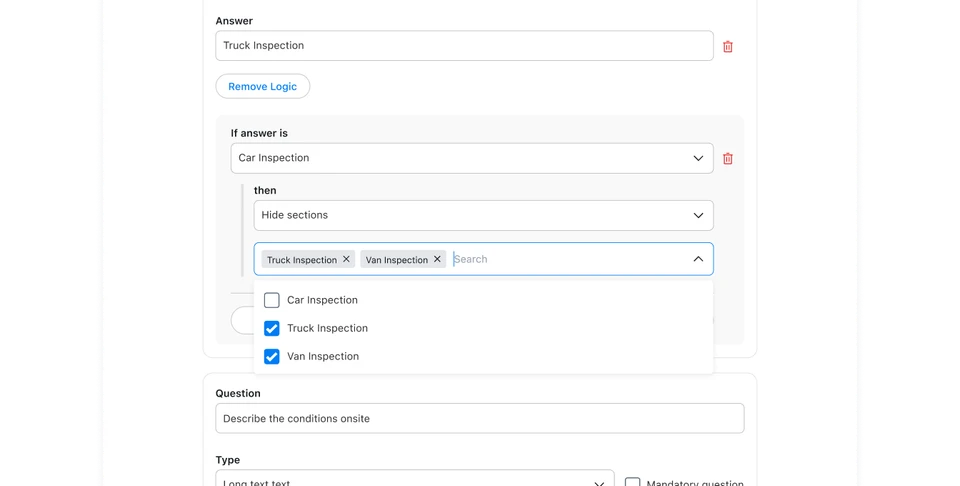
TLDR and Highlights
I led the design of the conditional logic functionality for eCompliance's safety forms. I researched the problem space, identified the key user needs, and shaped the experience for safety managers and field-level users.
⚡️
Conditional logic allowed customers to simplify how they organize their forms, receiving positive feedback:
"We were able to combine two forms (property damage and personal damage), which was great. The team is using it, It's really easy to use and set up. Overall, it's really useful."
User at Walker Industries
"It looks great!"
User at Black and McDonald
"We've been waiting on this, this is a life saver"
User at Canopy Growth
🎯
Forms with conditional logic had a 10% faster completion rate and achieved a 90% adoption rate among new customers.
💸
This enhancement supported around $900k in ARR from existing customers and assisted the Sales team in winning two new customers worth over $150k in ARR.
Background
eCompliance is a health and safety management product. Every day, hundreds of customers across industries such as construction, manufacturing, and energy use it to maintain a digital overview of their safety program and to ensure the safety of their front-line workers.
Forms play a central role in safety programs. Front-line workers complete inspection forms to ensure asset and environmental safety, handle incident forms for incidents, and document safety meeting topics using meeting forms.
At a high level, there are two main user personas involved in working with forms:
-
Safety managers, responsible for establishing and enforcing safety protocols. They create and configure forms.
-
Front-line workers, who work on-site and fill out these forms to ensure a safe environment.
The Why
Safety managers want to have fewer form templates in their libraries. They are overwhelmed by the amount of forms and would like to consolidate them and dynamically display their information. Additionally, they want to present more relevant information to front-line staff. Previous forms contained optional questions to cover all possible scenarios, many of which were irrelevant to the workers' situations. Implementing these changes would also result in faster form completion for front-line workers, increasing efficiency.
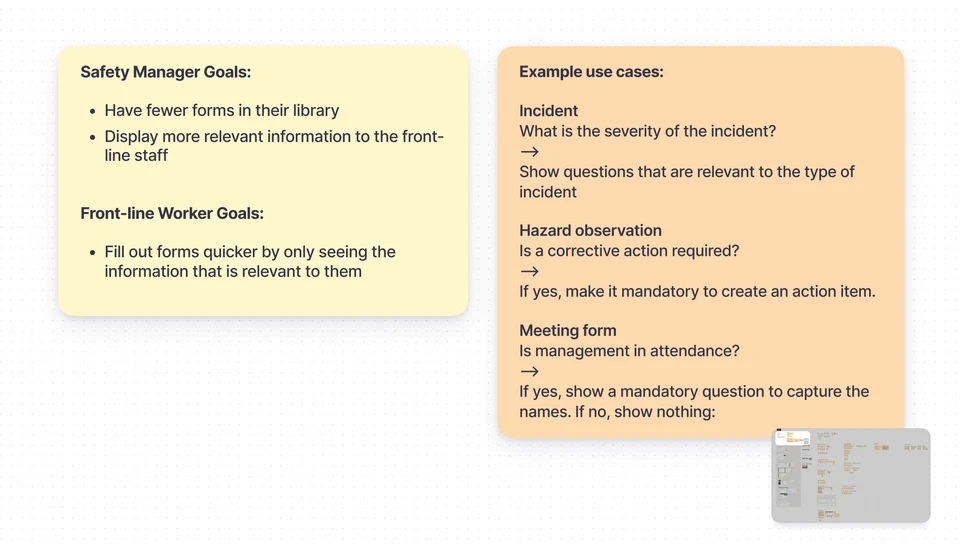
Based on input from the product manager and customer-facing teams, I categorized user needs by persona and applied them to relevant scenarios.
Research
I collaborated closely with the Product Manager to align on hard requirements and technical limitations. To pinpoint the user needs for Smart Forms, I references past customer support tickets and conducted interviews with the Customer Success and Onboarding teams.
We came out of those sessions with a clear understanding of the primary challenge — How can we combine forms and present relevant information to front-line users based on their specific situations?
I conducted a competitor audit to see how form-builders and other safety applications approach this problem.
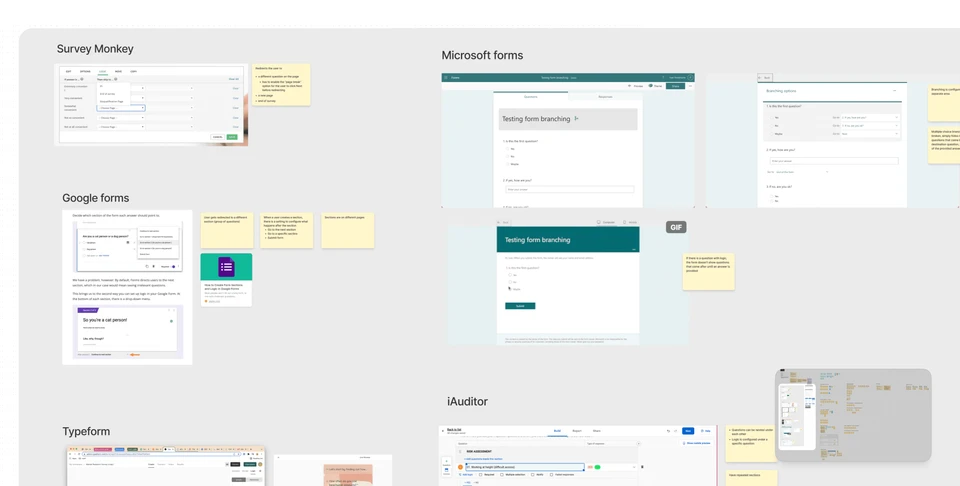
To outline potential design directions, I analyzed survey building tools like Typeform and SurveyMonkey, as well as direct competitors in the safety space.
Flow Definition
From my research, I uncovered two high-level approaches to combining forms and displaying relevant information to Front-line users:
-
Progressively showing sections of questions on a form based on answers
-
Displaying all sections and questions initially, then hiding irrelevant sections based on the user's answers
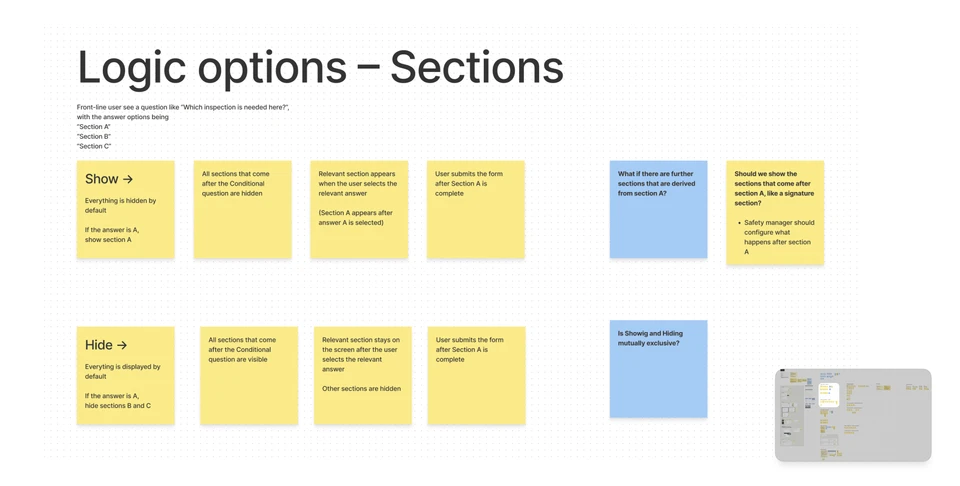
Initial options of combining sections on a form
I evaluated the options against the following criteria:
-
Ease of setup for Safety Managers
-
Usability of form completion for Front-line workers
-
Customer value: Does the solution support all possible content that Managers need to dynamically display?
After several rounds of design critique with project stakeholders and consulting internal Subject Matter Experts, I decided on a hybrid solution that incorporated elements from both approaches.
We chose to use hiding for configuring sections because it was significantly easier to set up. Additionally, we allowed users to progressively display individual follow-up questions. This hybrid approach offered the best of both worlds. Users could easily combine forms by hiding sections, while also having the ability to dynamically display context-specific questions within those sections.
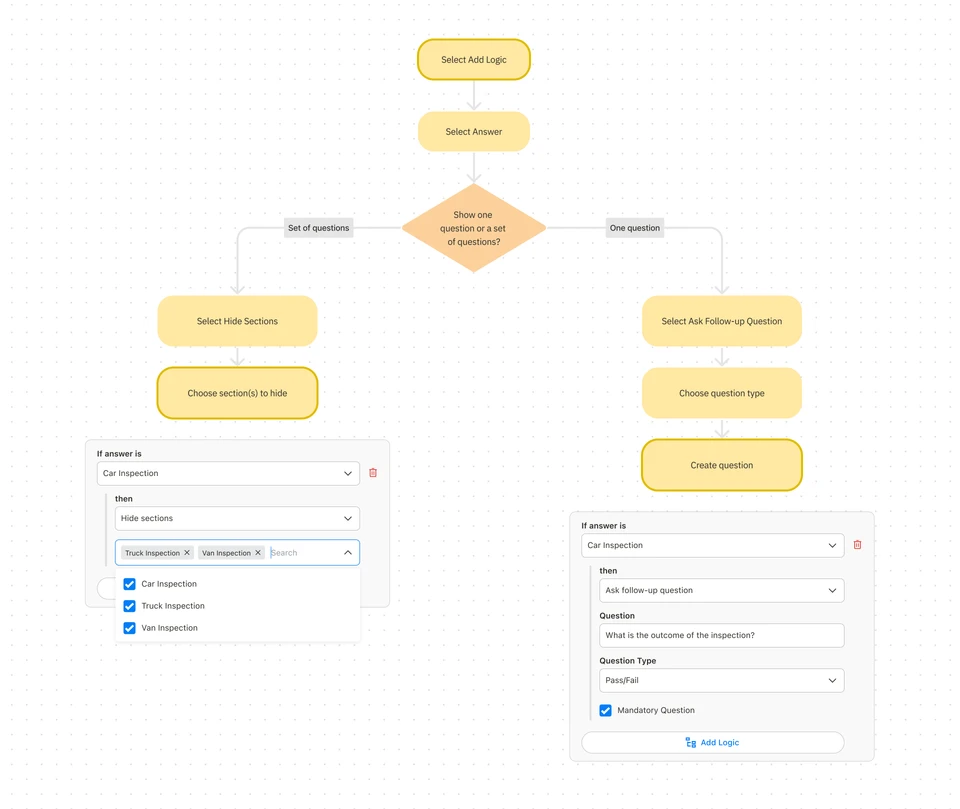
Flowchart of the hybrid solution that we shipped
Design and Testing
Designing the form logic UI was straightforward once we had completed our research and established a clear direction. I designed both the configuration flow for safety managers on the web app and the user flow for front-line workers on the mobile app.
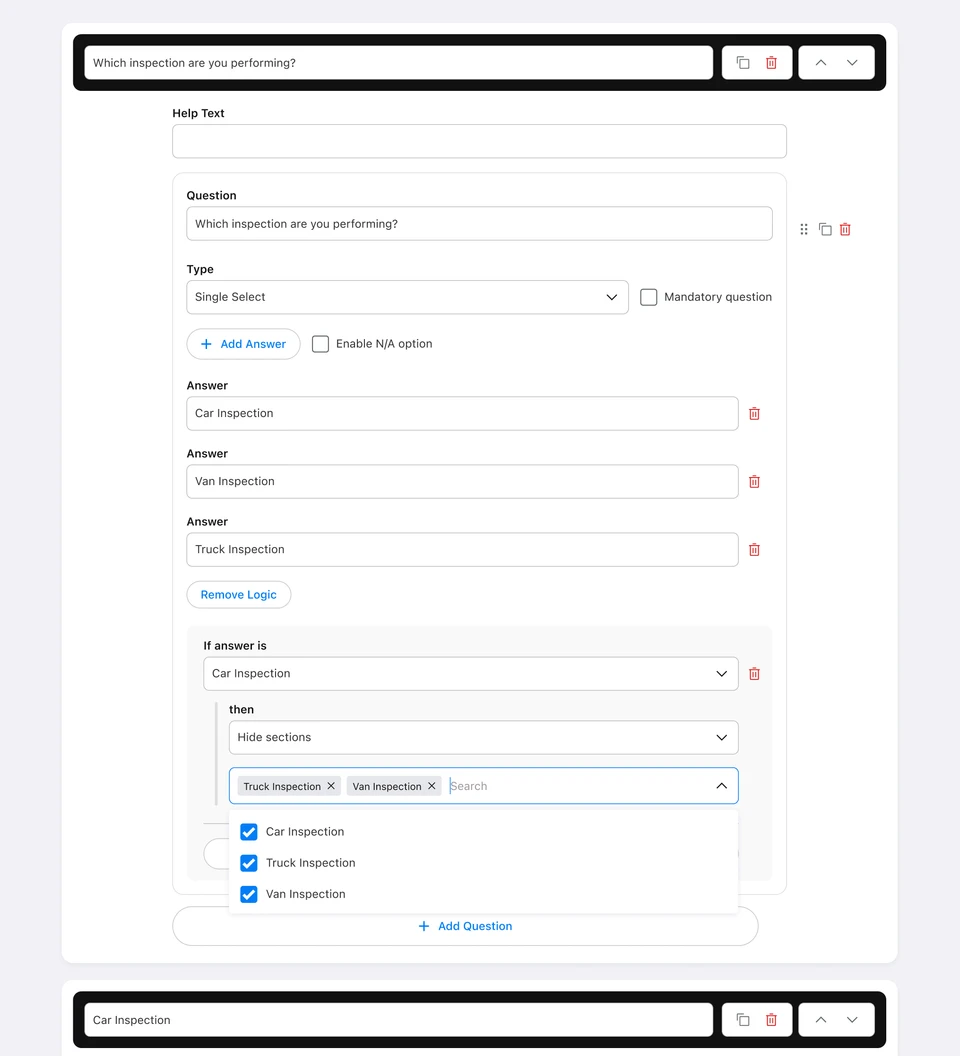
Logic configuration UI
I conducted a usability test to see if the configuration UI was clear. The results were positive, with all participants successfully completing the setup. One participant suggested adding a "Select All" option in the Section drop-down, particularly helpful for users with a lot of sections. This suggestion was integrated into the solution.
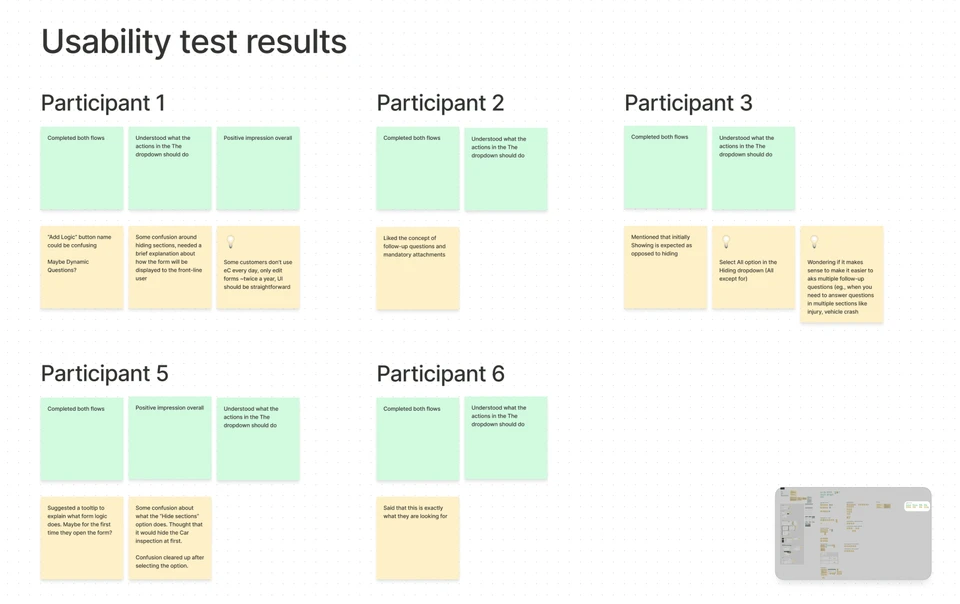
I conducted a total of six usability tests with internal stakeholders and current eCompliance users.
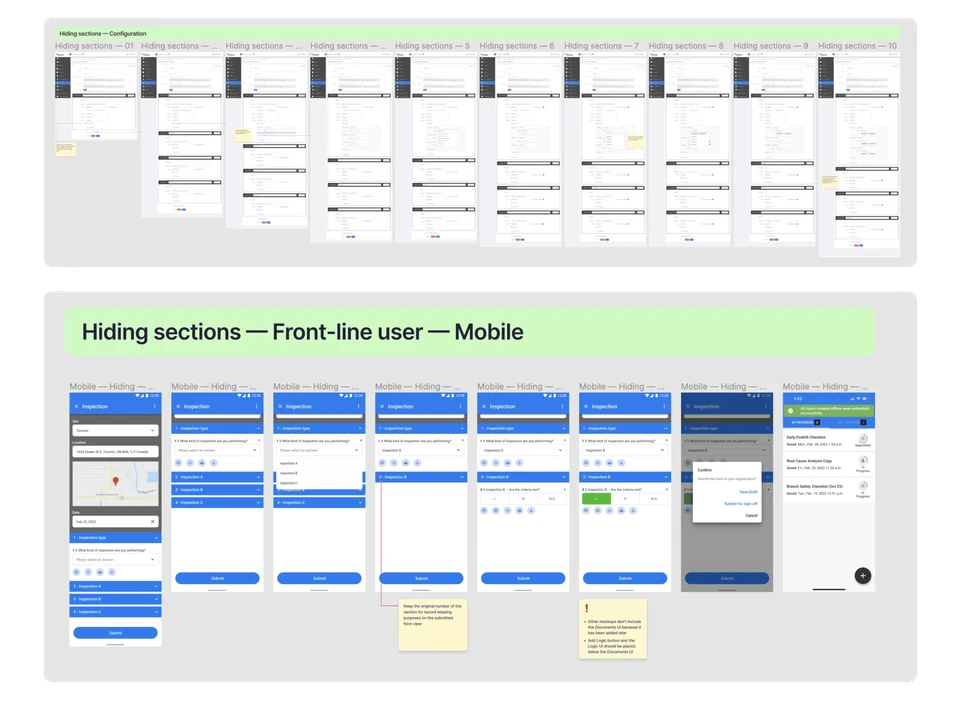
I designed the manager configuration flow as well as the mobile form completion experience. I supported the development team with UI notes to ensure a smooth handoff.
Release and Outcomes
We conducted Alpha and Beta releases for this feature, gathering feedback as we expanded access to more customers.
Here is what some of our customers said after trying out the feature:
"We were able to combine two forms (property damage and personal damage), which was great. The team is using it, It's really easy to use and set up. Overall, it's really useful."
User at Walker Industries
"It looks great!"
User at Black and McDonald
"We've been waiting on this, this is a life saver"
User at Canopy Growth
We eventually saw a 90% adoption rate among new customers and a 10% improvement in the completion speed in forms that included conditional logic.